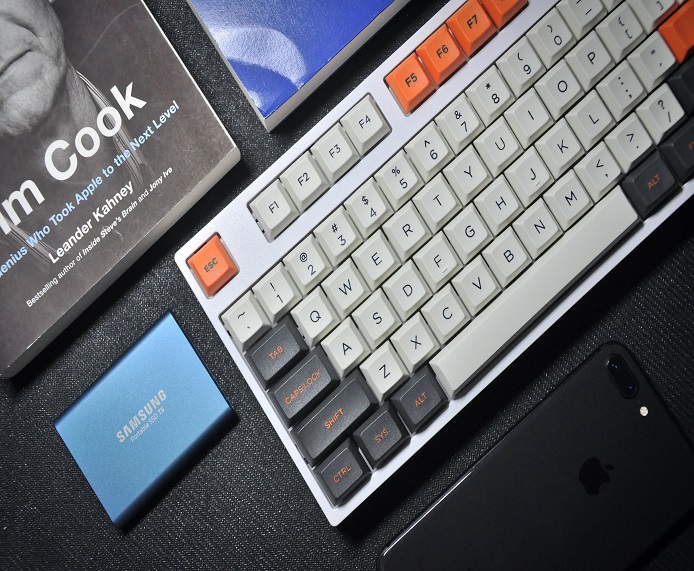
Keyboards
Keyboards
Overview
The mechanical typewriter invented by Christopher Latham Sholes in the late 1800s, was a revolutionary device that could imprint letters on paper with the touch of a key, replacing the laborious task of handwriting.
However, the original QWERTY keyboard layout that Sholes came up with had some flaws. The keys were arranged in a way that made typing fast difficult, as the most commonly used letters were placed far apart. The result was that typists would often jam the keys, causing the typewriter to stop working.
In the early 1900s, another inventor named August Dvorak decided to solve this problem by creating a new keyboard layout that would make typing more efficient. His design placed the most frequently used letters in the middle row and arranged the keys so that the fingers would move less, reducing fatigue and increasing speed. This layout became known as the Dvorak Simplified Keyboard.
Despite its benefits, the Dvorak keyboard didn't catch on immediately. The QWERTY keyboard had already become standard, and it was difficult to convince people to switch to a new system. However, some enthusiasts continued to promote the Dvorak keyboard, arguing that it was more comfortable and efficient.
Today, electronic keyboards have replaced the old mechanical typewriters, and both QWERTY and Dvorak layouts are still in use. Some people even create their own custom keyboard layouts, using the latest technology to design keyboards that fit their individual needs.
And so the story of the keyboard continues, evolving and adapting to the needs of each generation. Who knows what new innovations and designs we will see in the future?
Features
Keyboards come in many different shapes and sizes, with a variety of features that can make them unique and specialized for different purposes. Here are some examples of unique features you might find on keyboards:
- Mechanical switches: These are switches that use a physical mechanism to activate each key press, resulting in a tactile feel and an audible clicking sound. Mechanical keyboards are popular among gamers and typists who value the tactile feedback and durability of the switches.
-
Backlit keys: Some keyboards have keys that are illuminated, making them easier to see in low light conditions. This feature is particularly useful for gamers and those who work in dimly lit environments.
-
Programmable keys: Some keyboards have programmable keys that can be customized to perform specific functions or launch applications with a single press. This can be a time-saving feature for users who frequently perform certain tasks or use certain applications.
-
Ergonomic design: Keyboards with an ergonomic design are designed to reduce strain and discomfort on the hands and wrists, particularly for users who spend long hours typing. They may have a curved shape, a split design, or other features to promote more comfortable typing.
-
Wireless connectivity: Some keyboards connect to a computer or other device wirelessly, using Bluetooth or other wireless protocols. This can be a convenient feature for users who prefer to work without cords and cables.
-
Touchpads or trackballs: Some keyboards feature built-in touchpads or trackballs, allowing users to control the cursor without using a separate mouse. This can be a useful feature for users who prefer to work with minimal desk space.
These are just a few examples of the many unique features that keyboards can offer. Whether you're a gamer, a typist, or a casual computer user, there's sure to be a keyboard out there with the features and design that best suit your needs.
r/MechanicalKeyboards
Keyboards can be highly collectible for several reasons.
Overall, the reasons for keyboard collectibility can vary widely, but the combination of historical significance, rarity, design, customization, and nostalgia can all contribute to making certain keyboards highly sought after by enthusiasts and collectors.
Historical significance: Some keyboards have a significant historical or cultural value, either because of their design, their role in technological innovation, or their association with a famous user or event. For example, the Apple Extended Keyboard II, which was released in 1990, is highly sought after by collectors for its iconic design and its association with early Apple computers.
Rarity: Some keyboards are rare or limited edition, making them highly collectible. This might be because they were produced in small quantities, were only sold in certain regions, or were only available for a short period of time.
Design: Keyboards can be highly collectible for their design, whether it's because of their aesthetics, their ergonomic features, or their unique functionality. For example, the Happy Hacking Keyboard, which was designed in Japan in the early 2000s, has a minimalist design and a compact layout that has won it a devoted following among keyboard enthusiasts.
Customization: Some collectors are drawn to keyboards that have been customized or modified by their previous owners, whether it's through the addition of custom keycaps, the installation of a new switch mechanism, or other modifications.
Nostalgia: Some collectors may be drawn to keyboards that remind them of their youth or of a particular era in computing history. For example, the IBM Model M keyboard, which was produced in the 1980s and 1990s, is prized by many collectors for its distinctive buckling spring switches and its association with early IBM computers.
Keyboards have played a significant role in pop culture over the years, both in the entertainment industry and in the world of technology. Here are a few examples of how keyboards have made their mark on pop culture.
Music: Keyboards and synthesizers have been an essential part of popular music since the 1970s, when artists like Kraftwerk, Pink Floyd, and Stevie Wonder began incorporating electronic sounds into their music. Keyboards continue to be an important part of many musical genres, from pop and rock to hip-hop and electronic dance music.
Film and television: Keyboards have been featured prominently in many movies and TV shows over the years, often as a symbol of technology and modernity. For example, the 1983 film WarGames features a young hacker played by Matthew Broderick who uses a computer and keyboard to unwittingly start a nuclear war. Keyboards have also been used as props in many sci-fi films and TV shows, such as Star Trek and Blade Runner.
Gaming: Keyboards are an essential tool for PC gaming, and the gaming community has embraced a wide range of keyboard styles and designs, from traditional QWERTY keyboards to custom mechanical keyboards with LED lighting and programmable keys. Many popular video game streamers and content creators use keyboards as part of their setup, and some even design and sell their own custom keyboards.
Internet culture: The rise of the internet and social media has created a vibrant keyboard-centric culture, with memes, jokes, and slang revolving around keyboards and typing. For example, "keyboard warrior" is a term used to describe someone who aggressively argues online, while "ASDF" and "JKL;" are common phrases used to describe the home row of the QWERTY keyboard.
Overall, keyboards have become a ubiquitous part of modern culture, whether it's through music, film, gaming, or the internet. As technology continues to evolve, it will be interesting to see how keyboards and their role in pop culture continue to evolve as well.
There have been several films where a keyboard is prominently displayed in an iconic scene. Here are a few examples:
The Social Network (2010): In this biographical drama about the founding of Facebook, a keyboard is prominently displayed in several scenes, including the opening scene where Mark Zuckerberg, played by Jesse Eisenberg, is shown typing furiously on his computer while drinking and talking with his girlfriend.
WarGames (1983): In this classic Cold War-era thriller, a young hacker played by Matthew Broderick uses a computer and keyboard to unwittingly start a nuclear war simulation. The keyboard is a key prop in several scenes as Broderick's character attempts to hack into government computer systems.
Hackers (1995): In this cyberpunk thriller about a group of young hackers, keyboards are a central prop throughout the film. In one iconic scene, Angelina Jolie's character is shown typing frantically on her keyboard while wearing a virtual reality headset.
Sneakers (1992): In this caper film about a team of security experts who specialize in testing corporate security systems, a keyboard is prominently displayed in several scenes as the characters attempt to crack codes and bypass security measures.
Tron (1982): In this sci-fi classic, a computer programmer played by Jeff Bridges is digitized and transported into a virtual world where he must compete in gladiatorial games. Keyboards are a prominent feature throughout the film, including in the iconic scene where Bridges' character uses a light cycle to destroy a wall of computer terminals.
Overall, keyboards have played a prominent role in many films about technology, cybercrime, and virtual reality, often serving as a symbol of the power and potential of technology.
Milestones
-
Types of keyboards
-
Keyboard layout:
-
Key switches:
-
Customization:
-
Cleaning and maintenance: