909-276-7214

Speakers & Subwoofers

Computer Speakers:

//Here make like links take you to places inside the same page more often
History and Evolution:
Computer speakers have evolved from basic internal beeping mechanisms to sophisticated audio systems that cater to a wide range of needs, from gaming to music production.
Connectivity Options:
Different connectors like 3.5mm audio jacks, USB, Bluetooth, and even HDMI are used to connect computer speakers to various devices such as computers, smartphones, TVs, and gaming consoles.
Speaker Types:
Entry-level users might opt for basic stereo speakers, while enthusiasts might prefer bookshelf or multimedia speakers. Professionals often gravitate towards studio monitors for accurate sound reproduction.
Sound Quality:
Consider sound quality relative to your needs. Entry-level users can aim for balanced sound, while enthusiasts and professionals might seek better fidelity and accuracy.
Wireless Technology:
Bluetooth connectivity offers convenience for wirelessly connecting speakers to devices, making it popular for casual use.
Immersive Audio:
Enthusiasts and gamers might consider surround sound setups, while professionals value accurate sound reproduction for music production and audio editing.
Speaker Size and Placement:
Ensure that the size of the speakers fits your space. Placement can impact sound quality, so experiment with positioning for optimal results.

Computer Subwoofers:

  1. 1. Bass Enhancement:
    Subwoofers specialize in producing deep bass frequencies that regular speakers might struggle to reproduce effectively.
  2. 2. Entry-Level Considerations:
    Entry-level users can benefit from improved audio depth and immersion by adding a compact subwoofer to their setup.
  3. 3. Enthusiast Attention:
    Enthusiasts should look for subwoofers with a wide frequency response and adjustable settings to enhance their audio experience.
  4. 4. Integration with Speakers:
    Ensure your subwoofer complements your existing speakers, whether they're integrated or separate components.
  5. 5. Room Acoustics:
    Subwoofer placement and room acoustics greatly affect bass response. Experiment with positioning for balanced sound.
  6. 6. Professional Precision:
    Professionals, especially in audio production, require accurate and detailed bass representation for precise monitoring and mixing.
  7. 7. Crossover and Phase Control:
    Adjust crossover settings to ensure seamless integration between the subwoofer and main speakers. Phase control helps align audio waves.
  8. 8. Room Calibration:
    High-end subwoofers might come with calibration tools to adapt to your room's acoustics for accurate bass reproduction.
  9. 9. Multiple Subwoofers:
    Professionals working in larger spaces might use multiple subwoofers to achieve consistent bass distribution.
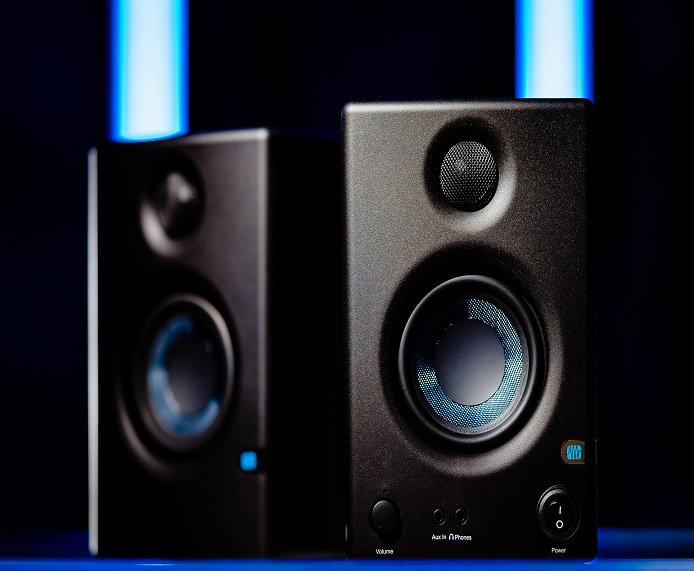
Inception and Early Days:

Computer speakers trace their roots back to the early days of computing when computers primarily used text-based interfaces.
In the 1980s and early 1990s, computer systems like the Commodore 64 and early IBM PCs used simple internal speakers that were capable of producing basic beeps and tones.
These sounds were primarily used for system alerts and rudimentary audio output in games and applications.

Evolution of Sound Quality:

As graphical interfaces and multimedia capabilities became more prevalent in computers, the demand for better audio quality grew.
By the late 1990s and early 2000s, computer manufacturers started incorporating better audio capabilities into their systems, including improved internal speakers and the ability to output sound through external speakers.

Introduction of External Speakers:

External computer speakers began to gain popularity as users sought to enhance their multimedia experiences.
These speakers were often connected via the standard audio jack, which was a 3.5mm mini-jack connector. This connector was also used for headphones and microphones. These early external speakers provided a significant improvement in audio quality over the internal speakers of that time.

Transition to Digital Audio:

With the advancement of technology, computer speakers transitioned from analog audio to digital audio interfaces.
USB (Universal Serial Bus) emerged as a popular connection method for digital audio, allowing for higher quality sound and more advanced features.
USB-powered speakers started to become more common, often providing better audio fidelity and the ability to play higher quality audio formats.

Surround Sound and Gaming:

As gaming and multimedia content became more immersive, the demand for surround sound capabilities grew.
Many computer speaker systems began to feature multiple speakers and subwoofers to create a more immersive audio experience, especially for gaming and home entertainment.

Wireless Connectivity:

In recent years, wireless connectivity options such as Bluetooth have become increasingly popular for connecting computer speakers.
This enables users to connect their devices to speakers without the need for physical cables. Bluetooth speakers offer convenience and versatility, allowing users to play audio from their computers, smartphones, and other devices wirelessly.

Current State:

Today, computer speakers come in a wide range of sizes, shapes, and configurations, catering to various needs and preferences.
From compact portable speakers to high-end surround sound setups, the market offers a plethora of options to suit different use cases.

Common Connectors:

The most common connectors used for computer speakers include:

3.5mm Audio Jack:

This is a standard connector size that is commonly used for connecting speakers, headphones, and microphones to computers and other devices.
It's often color-coded green for speakers, pink for microphones, and blue for line-in.

USB:

USB connectivity is commonly used for digital audio transmission.
USB-powered speakers often combine both power and audio data over a single USB connection.

Bluetooth:

Wireless Bluetooth connectivity allows you to connect speakers to devices like laptops, smartphones, and tablets without the need for physical cables.

HDMI:

In some cases, high-end computer speaker systems may connect through HDMI ports, especially if they are part of a multi-channel audio setup.

Connection Targets:

Computer speakers can connect to various devices including:

phone and tablet
Computers: Desktops, laptops, and all-in-one computers are primary targets for connecting computer speakers.
Smartphones and Tablets: Wireless speakers with Bluetooth connectivity can be paired with smartphones and tablets for portable audio playback.
TVs and Monitors: Some computer speaker systems can also connect to TVs and monitors to enhance audio quality for multimedia consumption.
Gaming Consoles: Gamers often connect computer speaker systems to their gaming consoles for a more immersive audio experience.

Speakers can greatly enhance the audio experience for entry-level users, enthusiasts, and professionals. Here's a breakdown of what each group should know:

Entry-Level Users
1. Sound Quality vs. Price:
Entry-level users should balance their budget with sound quality expectations.
While high-end speakers offer superior audio, there are affordable options that provide decent sound for basic tasks like web browsing and watching videos.
2. Compatibility:
Check if the speakers are compatible with your computer's audio output ports, whether it's a 3.5mm jack, USB, or Bluetooth.
3. Speaker Type:
Consider whether you want traditional stereo speakers, compact bookshelf speakers, or all-in-one options that combine speakers and subwoofers.
4. Space Constraints:
Choose speakers that fit your workspace or desk setup. Smaller speakers are often ideal for tight spaces.
5. Power Source:
Determine if the speakers are powered via USB, batteries, or a separate power adapter. USB-powered speakers are convenient for laptops.
6. Wired vs. Wireless:
Decide if you prefer wired or wireless speakers. Wireless speakers offer convenience but may have slightly higher latency.
Enthusiasts:
1. Sound Quality:
Enthusiasts should prioritize sound quality. Look for speakers with higher wattage, larger drivers, and possibly additional features like equalizers and customizable sound profiles.
2. Audio Source:
Consider your primary use: gaming, multimedia, music production, or a mix. Choose speakers that excel in your chosen area.
3. Connectivity Options:
Evaluate the range of connectivity options. USB, Bluetooth, and multiple input ports can offer flexibility for various devices.
4. Frequency Response:
Look for speakers with a wider frequency response range. This indicates the range of tones the speakers can reproduce, leading to more detailed sound.
5. Stereo vs. Surround Sound:
Decide if you want stereo sound or a more immersive experience with surround sound. Some systems offer virtual surround sound through software processing.
6. Build Quality:
Durable construction and quality materials can impact speaker longevity and overall performance.
Professionals:
1. Accuracy and Precision:
Professionals, especially those in audio production, should prioritize accurate sound representation. Look for studio monitors designed for precise sound reproduction.
2. Frequency Response Accuracy:
Pay close attention to the frequency response curve of studio monitors. A flat frequency response is essential for accurate audio work.
3. Active vs. Passive:
Professionals might consider active (powered) studio monitors with built-in amplification for consistent performance. Passive monitors require external amplification.
4. Room Acoustics:
Understand your room's acoustics and consider investing in acoustic treatment to optimize the sound of your speakers.
5. Connectivity and Inputs:
Look for speakers with a variety of inputs to accommodate multiple audio sources. Balanced XLR and TRS inputs are common in professional setups.
6. Calibration and Adjustability:
Some high-end speakers come with calibration tools to adjust sound output based on your room and preferences.
7. Size and Placement:
Choose the appropriate speaker size for your room. Larger rooms might require larger monitors for adequate sound dispersion.

Subwoofers are specialized speakers designed to reproduce low-frequency sounds, typically in the bass range. They can significantly enhance audio experiences by providing deep and powerful bass tones that regular speakers might not be able to reproduce effectively. Here's what entry-level users, enthusiasts, and professionals should know about computer subwoofers:

Entry-Level Users:
1. Basic Audio Improvement:
For entry-level users, a subwoofer can add depth to audio playback, making music, movies, and games more immersive.
2. Size and Space:
Consider the available space on your desk or in your room. Subwoofers come in various sizes, and smaller ones might be better suited for tighter spaces.
3. Simple Setup:
Most subwoofers connect to your computer's audio output, usually through a 3.5mm jack or USB connection. Check compatibility before purchasing.
4. Budget-Friendly Options:
Entry-level users can find affordable subwoofers that offer a noticeable improvement in bass without breaking the bank.
5. Integrated vs. Separate Subwoofers:
Some speaker systems come with integrated subwoofers, while others offer separate subwoofers that can be placed on the floor. Consider your space and preferences.
Enthusiasts:
1. Sound Quality Enhancement:
Enthusiasts seeking enhanced audio quality will appreciate a subwoofer's ability to reproduce deep bass frequencies accurately.
2. Frequency Response:
Look for subwoofers with a wide frequency response range, preferably going down to the lower limits of human hearing (around 20 Hz).
3. Matching with Speakers:
Ensure that the subwoofer's characteristics match well with your existing speakers, especially if you're using separate components.
4. Crossover Control:
Many subwoofers offer adjustable crossover settings. This determines the point at which the subwoofer takes over from the main speakers, preventing overlap.
5. Room Acoustics:
Consider the acoustics of your room. Subwoofer placement can significantly impact bass response. Experiment with positioning to achieve optimal results.
6. Amplification:
Some subwoofers are passive and require external amplification, while others are active (powered) and have built-in amplifiers. Active subwoofers simplify setup.
Professionals:
1. Accuracy and Precision:
Professionals, especially in audio production and mixing, should prioritize subwoofers that offer accurate and detailed bass representation.
2. Studio Monitors with Subwoofers:
Some studio monitor setups include a dedicated subwoofer for more accurate bass monitoring during music production.
3. Phase Adjustment:
Advanced subwoofers often offer phase adjustment settings to ensure that the subwoofer's output aligns well with the main speakers.
4. Frequency Response Linearity:
Look for subwoofers with a linear frequency response in their operational range. This ensures consistent and accurate bass reproduction.
5. Room Calibration:
High-end subwoofers might come with room calibration tools that help compensate for room acoustics, ensuring a balanced bass response.
6. Multiple Subwoofers:
In larger studios, professionals might opt for multiple subwoofers strategically placed to achieve more even bass distribution.
7. Low-End Extension:
Professionals might want subwoofers capable of reproducing extremely low frequencies for precise audio work and mixing.

Regardless of your level of expertise, consider factors like frequency response, placement, compatibility, and room acoustics when choosing a subwoofer. Also, keep in mind that a well-integrated subwoofer can greatly enhance the overall audio experience, whether you're a casual listener or a professional working with sound.

Here are some computer speakers fun facts:

The Birth of "Beeps":
Early computer systems used simple internal speakers that were capable of producing basic beeps and tones.
These beeps were not just for sound effects; they were often used as a form of diagnostic feedback to indicate errors during the boot-up process.
The First Sound Card:
The AdLib Music Synthesizer Card, released in 1987, is often considered one of the first sound cards for PCs. It allowed computers to produce more complex audio beyond basic beeps and laid the foundation for modern computer audio capabilities.
The Sound Blaster Revolution: Creative's Sound Blaster sound card, introduced in 1989, played a crucial role in shaping computer audio. It popularized digital audio playback and helped establish the multimedia capabilities of personal computers.
The MIDI Influence:
MIDI (Musical Instrument Digital Interface) played a significant role in early computer audio.
It allowed computers to control external synthesizers and produce a wide range of musical sounds, contributing to the rise of computer-generated music.
The "Magic Smoke":
A humorous phrase in the tech community is "magic smoke." It's said that electronic devices operate because they contain "magic smoke." If you let the magic smoke out (due to a malfunction), the device stops working.
Bass Shakers:
Some gaming enthusiasts use bass shakers in addition to speakers. These devices are attached to chairs or surfaces and vibrate in response to low-frequency audio, providing a tactile dimension to gaming and media experiences.
Text-to-Speech Pranks:
Text-to-speech technology has led to amusing pranks where people input humorous or nonsensical phrases for the computer to "speak." These pranks have gained popularity online, leading to various entertaining results.
Hidden Speaker Designs:
Some computer peripherals, like keyboards and monitors, have integrated speakers hidden within their designs. These speakers are often not immediately visible but provide audio output as a secondary feature.
DIY Speaker Builds:
Enthusiasts often engage in DIY projects to build custom computer speakers from scratch or modify existing ones. This hobby allows for unique designs and tailored audio experiences.
Silence Is Golden:
While speakers are known for producing sound, some high-end gaming setups include "soundproof" or "acoustic" foam panels to reduce noise pollution and ensure a quieter gaming environment.
Speaker Voice Coils as Heaters:
In a playful twist, some tech enthusiasts have used powerful speaker magnets and voice coils to create mini-heaters by allowing the coils to generate heat as they interact with the magnets.
High-End Audio Enthusiast Market:
Just like with regular home audio setups, there's a high-end market for audiophile-grade computer speaker systems. These systems can come with premium materials, advanced speaker technology, and exquisite craftsmanship.

These fun facts highlight the playful and innovative side of computer speakers, showcasing how they've evolved from simple beeps to complex audio systems that enhance our digital experiences.

[Free Research Preview. ChatGPT August 3 Version 2023]