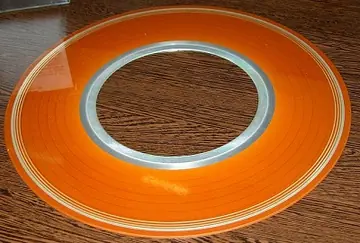
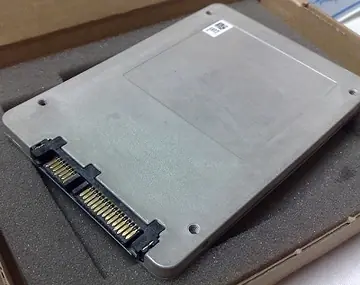
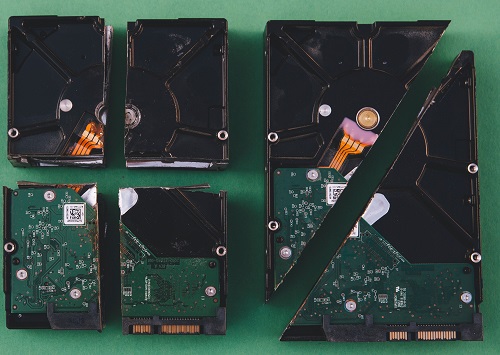
The main difference between an SSD and a Hard Disk Drive (HDD - shown above); is that the SSD doesn't have any moving parts and because of it, it makes reading and writing data much faster than a mechanical HDD, which has spinning platters. The platters work alongside an actuator arm that has a slider, think of it like a record player from back in the day.
Data was written and read magnetically, until In early 2007, when Samsung introduced its first generation SSD into the current market it had a capacity of 32GB, sequential read/write speeds of 57 MB/s and 32 MB/s respectively and a hefty price tag of around $1000.
The most common HDD has an average speed of 80-160 Megabytes per second, read and write speeds. An SSD speed is about 550 megabytes per second read and write speeds. An SSD is 410+ megabytes per second faster than a HDD.
Lets say your computer took one minute to be usable from when you first pressed the power button, now it takes thirty seconds, and when you transfer data on it, like from your phone, or an external hard drive is now much faster.
USB 2.0 cables transfer data at about 480-640 megabits per second.
(SSDs) use integrated circuits to store [write] and retrieve [read] data.
Unlike traditional hard disk drives (HDDs), which use spinning magnetic disks and a mechanical write head, SSDs require no moving parts.
An SSD supports more I/O operations, has a lower latency than HDD, and are "faster", smaller, more portable, more resistant to damage, and less affected by magnets than HDDs.
The traditional spinning HDD is the basic non-volatile storage on a computer. That is, information on it does not “go away” when you turn off the system, unlike data stored in RAM. An HDD is essentially a metal platter with a magnetic coating that stores your data.
A read/write head on an arm (or a set of them) accesses the data while the platters are spinning.
An SSD performs the same basic function as a HDD, but data is instead stored on interconnected flash-memory chips that retain the data even when there is no power flowing through them. These flash chips (often dubbed “NAND”) are of a different type than the kind used in USB thumb drives, and are typically faster and more reliable.
The key differences between HDDs and SSDs are that SSDs are faster, more reliable, and more expensive than HDDs. HDDs are cheaper and have more storage space than SSDs.
Solid state drives have revolutionized the way we store data on computers. They are faster, more reliable, and more affordable than traditional magnetic storage devices.
Due to the physical limitations of HDDs, currently the highest capacity is around 20TB, compared to the highest capacity SDD which is arround 100TB.
Once upon a time, magnetic storage was the only way to store data on computers. It was a revolutionary technology that allowed people to store large amounts of data in a small space. The first magnetic storage device was invented in 1956 by IBM and it was called the IBM 305 RAMAC1. It was the size of two refrigerators and could store up to 5 MB of data.
Magnetic storage devices were used for many years and they continued to improve over time.
Computer storage devices became smaller, faster, and more reliable. However, they had their limitations. They were prone to failure due to their mechanical nature and they were not very fast compared to other types of storage devices. Solid state drives (SSDs) were invented over half a century ago and then made widely commercially available. They use non-volatile solid state chips that feature flash memory cells to store data on a long-term basis. Unlike traditional hard disk drives (HDDs), which use magnetic platters spinning at high speeds to using an actuator arm reminiscent of a record player, SSDs require no moving parts.
This makes them much faster at reading and writing data, both ad hoc and in sustained operations. SSDs also have built-in technology that further improves read/write speeds, making them faster than traditional HDDs.
SSDs are also more reliable than traditional HDDs (from a mechanical and data integrity standpoint). They do not require an additional power source that maintains an electrical current into the device at all times to preserve the data. This makes them increasingly more reliable than traditional HDDs. The cost of SSDs has come down significantly over the years as well. They are now much more affordable than they used to be. The storage sizes have also increased significantly over time. Today's SSDs can store up to several terabytes of data.
How to Pick an SSD for your computer
Choosing the best SSD for your computer depends on several factors, including your specific requirements, budget, and compatibility with your system.
Keep in mind that the best SSD for your system depends on an specific use case. For general productivity and gaming, a mid-range NVMe SSD with ample capacity is often a good choice. When more performance is required for intensive tasks like video editing or professional applications, it is worth it to consider a high-end NVMe SSDs.
Selecting, and, or upgrading to an SSD:
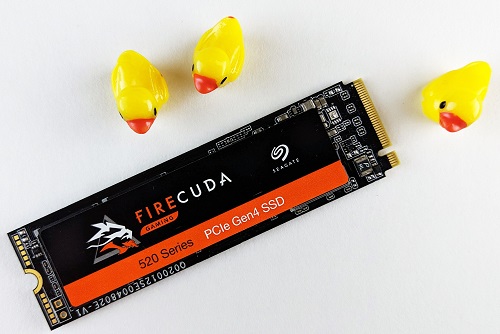
Form Factor: SSDs come in various form factors, such as 2.5-inch, M.2, and U.2. Ensure that the SSD you choose is compatible with your computer's available slots and connections.
Interface: The most common interfaces for consumer SSDs are SATA (for 2.5-inch drives) and NVMe (for M.2 and U.2 drives). NVMe offers faster speeds than SATA, so if your computer supports NVMe, it's generally a better choice for better performance.
Capacity: Determine how much storage you need. SSDs are available in different capacities, ranging from 128GB to several terabytes. Consider your current and future storage needs before deciding.
Performance: Look at the SSD's read and write speeds. NVMe SSDs generally have faster speeds than SATA SSDs, resulting in quicker boot times and faster file transfers.
Endurance: Check the TBW (Total Bytes Written) or DWPD (Drive Writes Per Day) rating to understand the SSD's endurance and expected lifespan, especially if you plan on performing a lot of read/write operations.
Cache: Some SSDs have cache memory to improve performance. A larger cache can positively impact the SSD's speed.
Brand and Reliability: Stick to well-known and reputable brands that have a history of producing reliable SSDs.
Price: Compare prices from different manufacturers and retailers, considering your budget and the overall value you get from the SSD.
Warranty: Check the warranty period offered by the manufacturer. A longer warranty generally indicates the company's confidence in the SSD's reliability.
Compatibility: Ensure that the SSD is compatible with your computer's operating system and hardware. Check for driver support if required.
Read Reviews: Read user and expert reviews to gain insights into real-world performance and reliability.
Data Migration: If you're replacing your existing hard drive with an SSD, check if the manufacturer provides data migration software or consider using third-party tools to clone your data to the new SSD.
TRIM Support: TRIM is a feature that helps maintain SSD performance over time. Ensure that your operating system and SSD support TRIM.
Overprovisioning: Some SSDs come with overprovisioning, which reserves a portion of the storage for background tasks to enhance performance and longevity.
Security: If data security is a concern, look for SSDs that offer hardware-based encryption and security features.
 An SSD speed is about 550 megabytes per second read and write speeds. An SSD is 410+ megabytes per second faster than a HDD.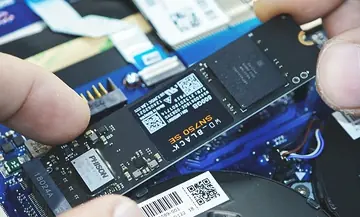
 That is, information on it does not “go away” when you turn off the system, unlike data stored in RAM. An HDD is essentially a metal platter with a magnetic coating that stores your data.